The collection / MileIn development

Mile

Mileage log and tax records

Hand your accountant a log they can file from.

Mile records every drive on your iPhone and prices it at the IRS rate for its date. At tax time you send a PDF with your totals beside the lines they go on.

Your log stays on your iPhone. Apple Maps supplies place names, and you can turn those lookups off. Full boundary

iPhone
In development. Not yet available to install.

Mile: Ready for your preparer. App preview with example content. In development.
Run the Audit check, then make the PDF tax log.App preview · Example content · In development

From the driveway to your return

Drive, sort, send.

Mile does the recording. You make the few decisions only you can make, and your accountant gets the record in the order they work.

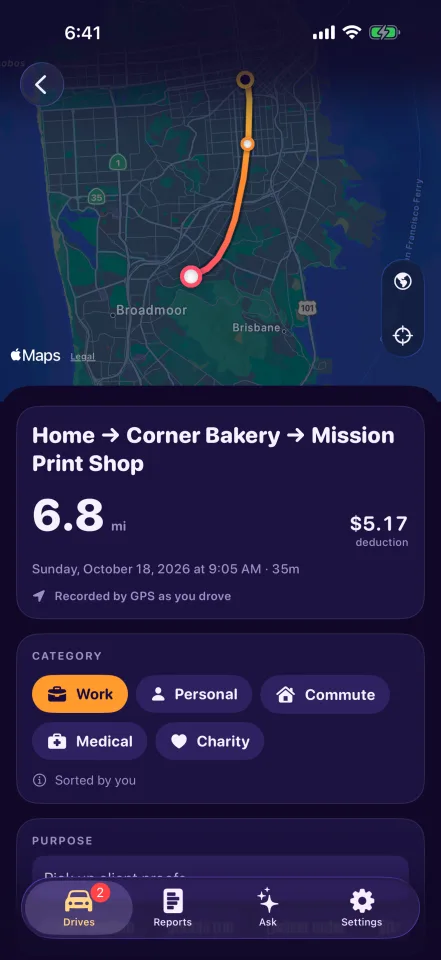
  1. Mile records the drive.

    The motion sensor notices you driving, GPS runs until you park, and the drive lands in your log with its route and places.

  2. You sort it.

    Mark it Work or Personal from the notification or type its purpose. Regular drives can be sorted for you with Mile Pro.

  3. Your accountant gets the report.

    The PDF tax log opens with the totals, then lists every deductible drive with its purpose and rate.

Mile keeps the record and is not tax advice. Ask your preparer what you can deduct.

A report your preparer can work from.

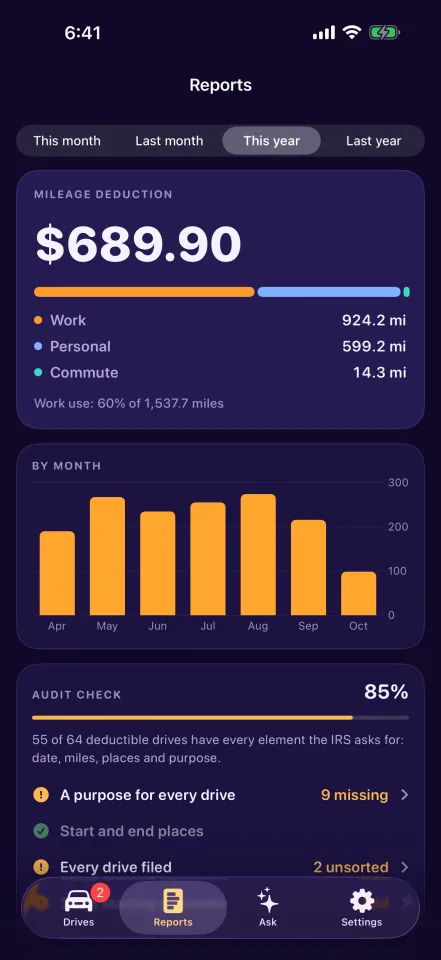
PDF tax log with Pro Totals by category sit beside their Schedule C and Form 4562 lines. Every deductible drive follows with its purpose and the IRS rate for its date, and each change to a drive stays in an edit history.

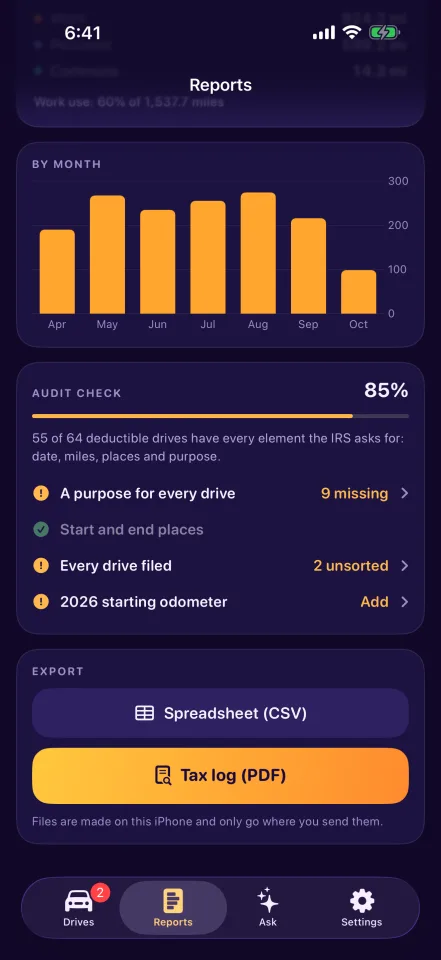
Find the gaps before April.

The Audit check lists work, medical, and charity drives without a purpose, drives without a place, and drives you have not sorted. Fix them in one list.

Paid back for your miles?

Reimbursement with Pro The reimbursement report lists your work drives with month subtotals, the rate used, and lines to sign, at the IRS rate or your employer's rate per mile.

Free and Mile Pro

Record every drive. Pay when the report matters.

In development

Planned features and limits are shown below. Pricing and compatibility will be confirmed before release.

Free

  • Every drive recorded
  • Sort and export 10 drives a month
  • Audit check, CSV export, and full backup

Mile Pro

  • No monthly limit
  • PDF tax log and reimbursement report
  • Ask, odometer ledger, and automatic sorting
  • More vehicles and saved places

Free · Pro $9.99/mo · $99/yr

Mile Pro is $9.99 a month or $99 a year. It renews until you cancel in your Apple Account settings.

What you will need

Mile requires iPhone with iOS 26. Automatic recording needs Location set to Always and Motion & Fitness. Ask uses Apple Intelligence where it is available.

Your log leaves with you.

Export a CSV or a PDF from Reports, or a full backup from Settings, and restore that backup on a new iPhone.

Mile has no server, so your backup is the only copy outside your iPhone and any iCloud device backup you keep.

The Boundary Check

How Mile handles your records.

Where the work happens, where your records live, and which features use a connection.

Where does the processing happen?
Detection, pricing, the Audit check, reports, and Ask all run on your iPhone.
Where does the storage live?
Your log stays on your iPhone. There is no account and no Mile server.
What connects to the network, and when?
Apple Maps supplies place names and receives the points where a drive starts, stops, and ends, unless you turn lookups off. Apple handles purchases.
Read the collection’s privacy model

Before release

Questions about Mile.

The motion sensor notices driving, and Mile turns on GPS until you park. To do this with the app closed, it needs Location set to Always and Motion & Fitness.